081-359-6920
,
02-402-6117
sale@prosoftwinspeed.com
ลงทะเบียน Demo
Menu
Home
Products
WINSpeed Cloud
Customer and Sales
Vendor and Procurement
Manufacturing
Warehouse Management
Accounts Receivable
Accounts Payable
Cheque Receive
Cheque Payment
Petty Cash
Advance System
General Ledger
Value Added Tax
WINSpeed 10 (Client/Server)
Overview
Key Feature
Screenshots
Reports
Sales Order
Purchase Order
Accounts Receivable
Accounts Payable
Inventory Control
Warehouse Management
Job Cost
General Ledger
Budget Control
Cheque and Bank
Petty Cash
Advance System
Multi Currency
Letter of Credit
Commission Management
Consignment
Audit and Internal Control
Value Added Tax
CRM
Fixed Assets
Solutions
ธุรกิจโรงพยาบาล
ธุรกิจเหล็ก
ธุรกิจการผลิต
ธุรกิจนำเข้า-ส่งออก
ธุรกิจอสังหาริมทรัพย์
ธุรกิจก่อสร้าง
ธุรกิจฝากขาย
Services
Download Brochure
System Requirements
จองอบรม Online
FAQ Online
E-learning
คู่มือการใช้งาน (Help)
New Feature
E-Newsletter
บริการ Maintenance
บริการเสริม
วิธีการชำระเงิน
Customers
ลูกค้าของเรา
Success Stories
บรรยากาศการอบรม
More
ข่าวสารและกิจกรรม
บทความ
About Us
Company Profile
Organization
Management Team
Our Business
Awards & Standards
Prosoft Group
Our Family
Social Enterprise
Job Opportunity
Gallery
Office Location
นโยบายการรักษาข้อมูล
Contact Us
หน้าแรก
เชิงเทคนิคโปรแกรม
Notification Area ใน Windows 7 คืออะไร
Notification Area ใน Windows 7 คืออะไร
ย้อนกลับ
หน้าแรก
เชิงเทคนิคโปรแกรม
Notification Area ใน Windows 7 คืออะไร
Notification Area ใน Windows 7 คืออะไร
ย้อนกลับ
Q:
Notification Area ใน Windows 7 คืออะไร
A:
Notification Area ใน Windows 7 คืออะไร
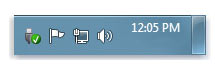
ช่องทางในการที่ Windows จะสื่อถึงผู้ใช้งานได้ว่า ระบบมีการปรับปรุงหรือมีปัญหาอะไรอยู่ จะทำการแจ้งผ่าน Notification Area ซึ่งเป็นตำแหน่งด้านล่างทางขวามือของ Taskbar อยู่ในกลุ่มเดียวกับ วันที่และเวลา ผู้ใช้งานทุกคน ควรสังเกตและพยายามตรวจสอบว่า โปรแกรม Windows กำลังแนะนำอะไรเราอยู่ ซึ่งเรื่องนี้ เป็นสิ่งที่จำเป็นมากสำหรับทุกคน เพราะถ้าเราไม่ได้มีการสังเกต อาจมีผลทำให้ระบบ Windows มีปัญหาได้
เมื่อมีข้อความแสดงที่ Notification Area เราควรทำการวิเคราะห์ปัญหาก่อนเสมอ
ตัวอย่างข้อความที่ Windows มักแจ้งมายังผู้ใช้งาน
• การเสียบ Flash Drive เข้าพอร์ต USB
• Windows มีการอัปเดต
• ระบบรักษาความปลอดภัยไม่ได้เปิด
• โปรแกรมแอนตี้ไวรัสถูกปิด หรือ disable
• รูปธง แสดงว่า Windows มีอะไรอัปเดตใหม่ๆ
2341
ผู้เข้าชม
หมวดหมู่
2963
ทั้งหมด
การใช้งานโปรแกรม
2729
Enterprise Manager
293
Accounts Payable
152
Accounts Receivable
203
Budget Control
8
Cheque and Bank
76
Financial Management
30
General Ledger
71
Inventory Control
258
Letter of Credit
0
Multicurrency
176
Petty Cash
46
Purchase Order
289
Sale Order
410
Value Added Tax
83
Messenger Management
15
Inquiry
4
Company Manager
33
Campaign Module
17
Customer Relationship Management
13
Job Cost
134
Advance System
26
Warehouse Management
155
Audit and Internal Control
92
Import and Export
38
Commisssion Management
23
Service Center
31
Transport Management
12
Consignment
14
Fixed Assets
24
การติดตั้งโปรแกรม
34
เชิงเทคนิคโปรแกรม
104
Tab เครื่องมือ
96
เว็บไซต์นี้ใช้คุกกี้ (Cookies) เพื่อให้ท่านได้รับประสบการณ์การใช้งานที่ดียิ่งขึ้น
นโยบายคุกกี้
ตั้งค่าคุกกี้
ยอมรับทั้งหมด
×
ตั้งค่าความเป็นส่วนตัว
คุกกี้พื้นฐานที่จำเป็น
เปิดใช้งานตลอดเวลา
คุกกี้พื้นฐานที่จำเป็น เพื่อช่วยให้การทำงานหลักของเว็บไซต์ใช้งานได้ รวมถึงการเข้าถึงพื้นที่ที่ปลอดภัยต่าง ๆ ของเว็บไซต์ หากไม่มีคุกกี้นี้เว็บไซต์จะไม่สามารถทำงานได้อย่างเหมาะสม และจะใช้งานได้โดยการตั้งค่าเริ่มต้น โดยไม่สามารถปิดการใช้งานได้
คุกกี้ในส่วนวิเคราะห์
คุกกี้ในส่วนวิเคราะห์ จะช่วยให้เว็บไซต์เข้าใจรูปแบบการใช้งานของผู้เข้าชมและจะช่วยปรับปรุงประสบการณ์การใช้งาน โดยการเก็บรวบรวมข้อมูลและรายงานผลการใช้งานของผู้ใช้งาน
คุกกี้ในส่วนการตลาด
คุกกี้ในส่วนการตลาด ใช้เพื่อติดตามพฤติกรรมผู้เข้าชมเว็บไซต์เพื่อแสดงโฆษณาที่เหมาะสมสำหรับผู้ใช้งานแต่ละรายและเพื่อเพิ่มประสิทธิผลการโฆษณาสำหรับผู้เผยแพร่และผู้โฆษณาสำหรับบุคคลที่สาม
สร้างเว็บไซต์สำเร็จรูปฟรี
By SoGoodWeb.com